
Image upscaler for printing
Make small pictures big and sharp enough to print — T-shirt designs, posters, book covers and clip art. GizmoBloom's AI redraws the detail on your own computer and saves the picture at 300 dpi.
Bigger and sharper, not blurry Works offline
- ×2, ×3 or ×4 — GizmoBloom suggests the size: ×4 for a small picture, ×2 for a bigger one
- The AI adds pixels and redraws the detail, so lines stay clean and colors stay crisp
- A model for drawings (clip art, cartoons, coloring pages) and one for photos and paintings, chosen by what it sees — and "best detail" for the finest result
- A picture that was only stretched before is first brought back to its real size, then redrawn: that is what makes it sharp again
- Before and After with the same zoom, so you compare the same spot
- PNG or JPG with 300 dpi written in the file, up to 10,000 px on a side
How big should a picture be for printing?
For a sharp print, use 300 pixels for every inch you print (300 dpi):
- An 8.5 × 11 inch page: 2550 × 3300 px
- A T-shirt print file: 4500 × 5400 px, that is 15 × 18 inches at 300 dpi — the size most print-on-demand sites ask for
- A 1200 × 1200 px AI picture made ×4: 4800 × 4800 px, enough for a 16-inch print
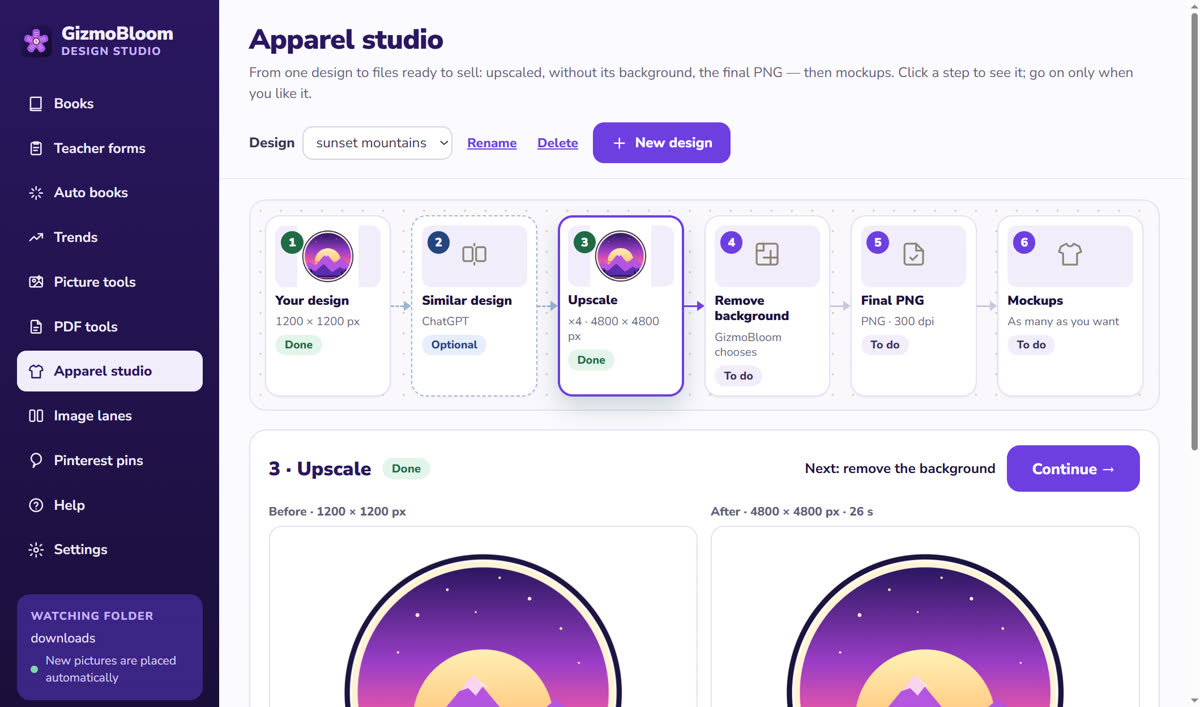
For T-shirts, GizmoBloom's Apparel studio does it all by itself: upscale ×4, remove the background, then the print file. See the T-shirt design generator.
On your computer, with no fee per picture
- It runs on your computer's own graphics chip — ordinary laptop graphics too
- No uploads, no credits and no monthly limit
- The upscaler downloads once, the first time you use it; then it works without internet
- Many pictures at once: bigger, without their background, as coloring pages, or PNG ↔ JPG
- "Remove its background next" takes the bigger picture straight to the background remover
Questions about the upscaler
How much bigger can I make a picture?
2, 3 or 4 times bigger, up to 10,000 pixels on the longest side.
Does it make my picture 300 dpi?
GizmoBloom writes 300 dpi in the file. What makes a print sharp is having enough pixels — 300 for every inch you print — and the upscaler adds them with real detail, not stretched pixels.
Does it work offline?
Yes. The upscaler downloads once, the first time you use it; after that it works without internet, and your pictures never leave your computer.
Can I upscale photos?
Yes: the photo model keeps natural skin, hair and texture, for photos and paintings.
Is it good for clip art and coloring pages?
Yes: the drawing model keeps clean lines for clip art, cartoons and coloring pages.
Try the upscaler free
Try every feature for 3 days, no card needed. Files made during the trial carry a small SAMPLE mark.
Also in GizmoBloom: the offline background remover, the T-shirt mockup generator and the PDF tools.