
TPT thumbnail maker and size guide
Everything a Teachers Pay Teachers product needs, made from your real pages: four square thumbnails at the right TPT thumbnail size (2000 × 2000 px), a preview PDF, the product ZIP and a listing ready to paste.
Free TPT thumbnail resizer
Make any picture the TPT thumbnail size: choose it, keep Square (2000 × 2000) and press Resize and convert. As JPG, a picture that is not square gets white around it; choose "Fill the size" to cut its edges instead. Free, and your picture never leaves your phone or computer.
What size should TPT thumbnails be?
TPT shows product thumbnails as squares, so make them square. For the Teachers Pay Teachers thumbnail size, GizmoBloom uses 2000 × 2000 px — TPT thumbnail dimensions that stay sharp on big screens and in search results, and still light enough to upload.
- Square, 1:1: nothing gets cut off when TPT shows it small
- 2000 × 2000 px: big enough to stay crisp when buyers zoom in
- Big, short titles: buyers first see your thumbnail tiny in the search results, so the words must read at that size
- Your real pages on every thumbnail: buyers trust what they can see
- Four different thumbnails, each with its own job: the cover, what's inside, a close-up, and what you get
GizmoBloom makes all four at this size for you, in one click, from the pages of your product.
TPT cover size, thumbnail size and preview size
Three words sellers mix up, and what each one needs:
- Cover: your first thumbnail, the picture buyers see in the search results. Same size as the other thumbnails: square, 2000 × 2000 px in GizmoBloom, made from your product's cover page.
- Thumbnails: the four square pictures on your product page. Each one has a job: the cover, what's inside, a close-up, and what you get.
- Preview: a PDF that buyers open before they buy, not a picture. GizmoBloom makes it from your cover and 4 pages, at the same page size as your product (US Letter or A4), with a light PREVIEW mark on every page. Answer keys are never in it.
TPT thumbnail examples: four that show your product
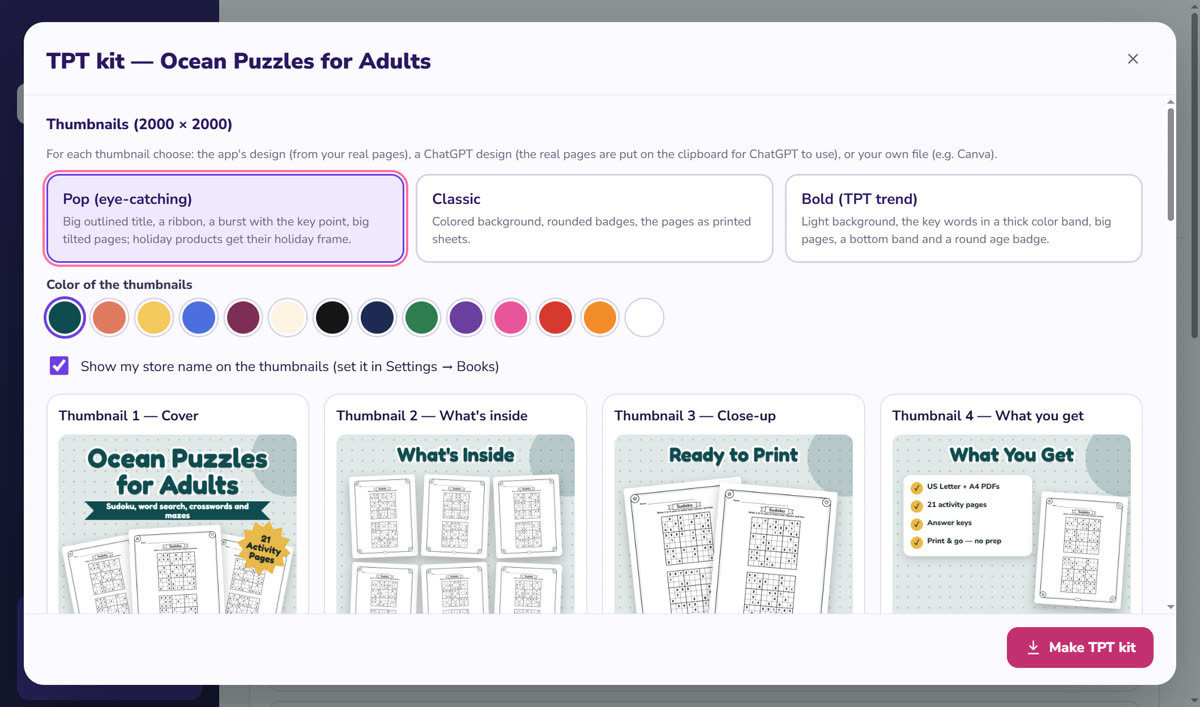
- Cover, What's inside, Close-up and What you get — 2000 × 2000 px each
- Three styles: Pop (eye-catching), Classic, or Bold (the TPT trend); in Pop, holiday products get their holiday frame
- 14 colors, and your store name on the thumbnails if you like
- For each thumbnail: the app's design from your real pages, a ChatGPT design, or your own file
- Move, zoom and change the texts — or "Draw again" for another look
The whole TPT kit
- A preview PDF made from your pages
- The product ZIP with all the files
- A listing written from the real pages: a title with your keywords first, the description, "What's included" from the files GizmoBloom made, and an SEO check
- For books, poster sets, classroom kits and teacher forms — and for French or Spanish books in their language
How to make a TPT kit
Make the PDF
Make your product first: a book's "Make PDF", or your teacher forms.
Open the TPT kit
Choose the style and the color, and check the four thumbnails.
Upload on TPT
Press "Make TPT kit", then upload the files on TPT with "Add a new product".
Watch it step by step
From the GizmoBloom Complete Guide. All 16 parts →
Questions about TPT kits
What size are TPT thumbnails?
Make them square. GizmoBloom makes each one 2000 × 2000 px, so they stay sharp on every screen and when buyers zoom in.
What size is a TPT cover?
The cover is your first thumbnail, so it has the same size: square. GizmoBloom makes it 2000 × 2000 px from the cover page of your product.
What size is the TPT preview?
The preview is a PDF, not a picture. GizmoBloom makes it from your cover and 4 pages, at the same page size as your product (US Letter or A4), with a light PREVIEW mark. Answer keys are never in it.
Do I need a TPT thumbnail template?
No: GizmoBloom designs the thumbnails from your real pages in three styles (Pop, Classic, Bold) and 14 colors, so there is no template to fill in. You can still use your own Canva design for any of the four.
How many thumbnails does GizmoBloom make?
Four: the cover, what's inside, a close-up of a page, and what you get. Each shows your real pages.
Can I use my own design for a thumbnail?
Yes: any of the four thumbnails can be your own file, for example one you made in Canva.
Does GizmoBloom upload to TPT for me?
No: it never logs in to your store. You upload the files on TPT yourself, with "Add a new product".
What is "What's included"?
The list buyers read on your product page — written from the files GizmoBloom made: the PDFs and their sizes, the number of pages, the answer keys.
How do I know what sells on TPT?
Trends shows what teachers type on TPT and how many products already compete for each phrase, with "Check on TPT" next to every idea. See Trends.
What is the TPT product thumbnail size?
The same as every TPT thumbnail: a square. GizmoBloom makes them 2000 × 2000 px; to make one picture that size, use the free resizer at the top of this page.
What size is a TPT cover page?
The cover page is the first page of your PDF, so it has your product's page size: US Letter (8.5 × 11 in) or A4. Your cover thumbnail is the square picture made from it.
Make your first TPT kit free
Try every feature for 1 day, no card needed. Files made during the trial carry a small SAMPLE mark.
Also in GizmoBloom: editable teacher forms, the puzzle book maker and Pinterest bulk upload.