
How to make a printable PDF booklet
A folded booklet is easy to print at home: a few sheets printed on both sides, folded in half and stapled on the fold. The hard part is the page order. This guide shows how it works, which printer settings to use and which mistakes to avoid — with a booklet maker or without one.
The short version: use a page count that is a multiple of 4. Put the pages in booklet order — for 8 pages, 8 | 1 and 2 | 7 on sheet 1, 6 | 3 and 4 | 5 on sheet 2. Print on both sides with flip on short edge, at actual size. Fold with page 1 outside and staple on the fold.
What a folded (saddle-stitch) booklet is
A saddle-stitch booklet is a few sheets folded in half, nested inside each other and stapled through the fold. Zines, event programs, recipe booklets and many printables sold on TPT and Etsy use this format. A home printer and a stapler are enough.
Each side of a sheet holds two pages, side by side, so the page size comes from the sheet:
- US Letter (8.5 × 11 in) folds into a half-letter booklet: pages 5.5 × 8.5 in.
- A4 (210 × 297 mm) folds into an A5 booklet: pages 148 × 210 mm.
Why the page count must be a multiple of 4
One sheet folded in half makes 4 pages: 2 on the front and 2 on the back. So a booklet has 4, 8, 12, 16… pages, and it needs the page count ÷ 4 sheets. The covers count: page 1 is the front cover and the last page is the back cover.
Any other count needs blank pages, up to the next multiple of 4:
- 8 pages → 2 sheets, no blank pages
- 10 pages → 12 pages: 3 sheets, 2 blank pages
- 13 pages → 16 pages: 4 sheets, 3 blank pages
Blank pages usually go at the end. You can also plan them: a "Notes" page or a plain back cover looks intended, not forgotten.
The page order (imposition), made simple
Printers call this step imposition: placing pages on sheets so they read in order once folded. Page 1 does not sit next to page 2. It sits next to the last page, because the outside sheet carries both covers.
Three rules let you check any booklet:
- On each side, the two numbers add up to the page count + 1. In an 8-page booklet every pair makes 9: 8 + 1, 2 + 7, 6 + 3, 4 + 5.
- Even pages are on the left, odd pages on the right — on the front and on the back, like an open book.
- Sheet 1 is the outside sheet. Each next sheet goes inside the one before.
A 12-page booklet works the same way, on 3 sheets:
- Sheet 1: front 12 | 1, back 2 | 11
- Sheet 2: front 10 | 3, back 4 | 9
- Sheet 3 (middle): front 8 | 5, back 6 | 7
Placing pages by hand is slow and easy to get wrong. A booklet maker — also called a booklet generator or PDF booklet creator — saves a new PDF where each page is one side of a sheet.
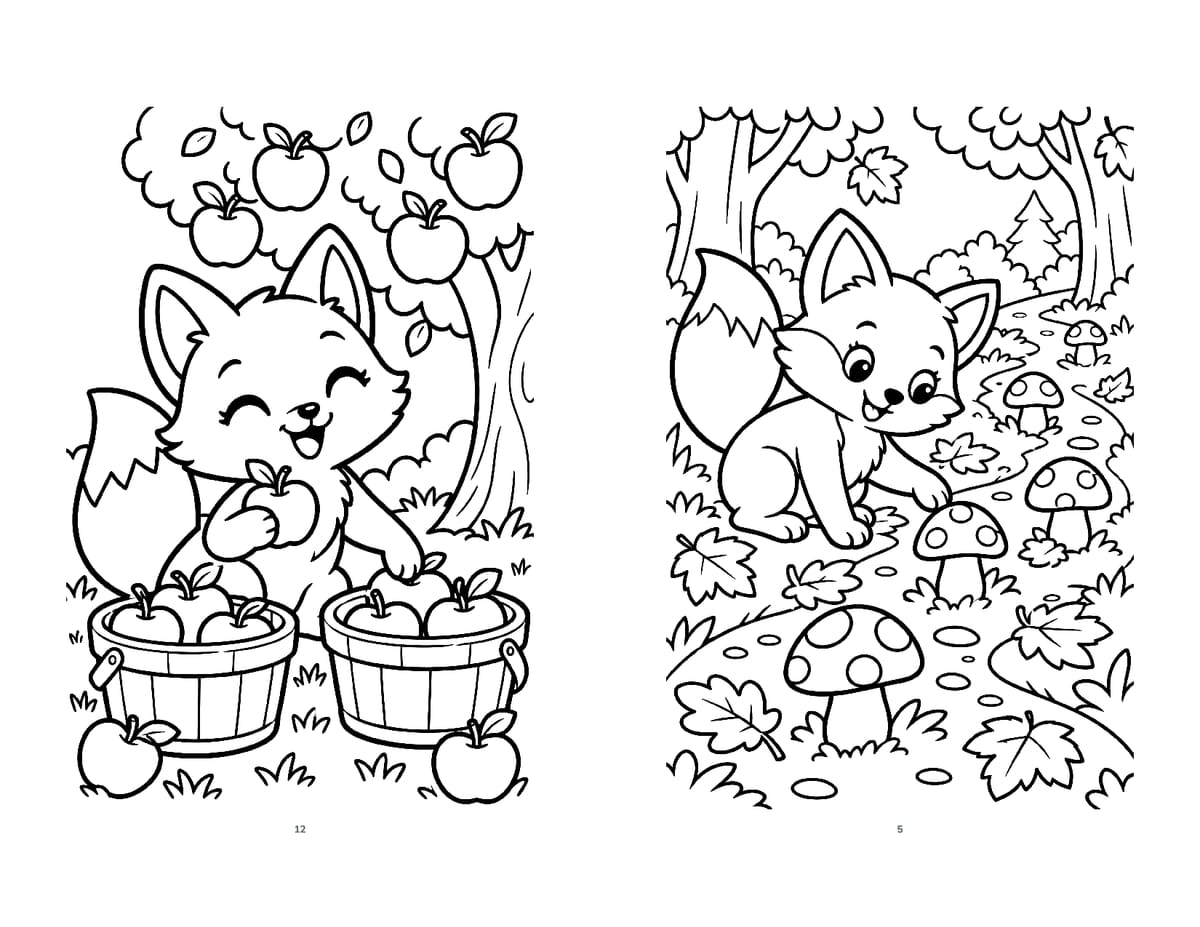
Size, margins and the fold
Your pages get smaller
Full-size pages are shrunk to fit half a sheet:
- A4 → A5: about 71%. A4 and A5 have the same shape, so each page fills its half.
- US Letter → half-letter: about 65% (5.5 ÷ 8.5). A Letter page is a little wider for its height, so a white band shows above and below it.
Text shrinks too: 12 pt text on a Letter page prints at about 8 pt. Use 14 pt or more, or design your pages at the booklet size from the start.
Keep a safe margin
Most home printers leave a small border they cannot print, often 3–6 mm (1/8 to 1/4 in). Your pages' outer edges are the paper's edges, and their inner edges disappear a little into the fold. Keep text and key art about 0.5 in (12 mm) from every edge of the final page — about 0.75 in on a full-size Letter page that will be shrunk.
Thick booklets "creep"
In a thick booklet, the inner sheets stick out a little at the open edge. Printers call this creep. Under about 40 pages it rarely matters. Above that, keep content farther from the outer edge, or trim the edge with a paper cutter.
How to print a booklet at home
For a PDF already in booklet order (two booklet pages on each PDF page), open the print window and set:
- Paper size: the PDF's sheet size — US Letter or A4.
- Orientation: landscape, or "auto" so it follows the PDF.
- Scale: "Actual size" (100%). If your printer cuts off the outer edges, "Fit" shrinks everything a little.
- Two-sided: "Print on both sides" with Flip on short edge. Some printers call it "short-edge binding".
- Test: print only PDF pages 1–2 (sheet 1). The back should be upright, with page 2 behind page 1.
- Print the rest.
No automatic two-sided printing?
Print the odd PDF pages (the fronts), put the stack back in the tray, then print the even pages (the backs). Adobe Acrobat Reader has "Odd or Even Pages" and "Reverse pages" under More options. How the paper goes back in depends on your printer: mark the top of a test sheet with a pencil and try 2 sheets first.
Already a booklet? Skip the "Booklet" setting
Acrobat Reader's free Booklet option (under Page Sizing & Handling) prints a normal PDF as a booklet. Used on a PDF that is already in booklet order, it arranges the pages a second time: you get small pages in a mixed-up order. Print a ready-made booklet at actual size.
Fold and staple
- Order: sheet 1, with page 1 on it, goes outside.
- Fold: a thin booklet all at once; a thicker one sheet by sheet, then nest them. Crease with the edge of a ruler.
- Staple on the fold: two staples, about a quarter of the way in from the top and the bottom. A long-reach stapler (its arm reaches about 12 in) does it easily; most take about 20 sheets.
- No long-reach stapler? Lay the open booklet cover side up on cardboard. Open your stapler flat, staple through the fold, then press the staple legs flat on the inside.
- Sturdier cover: print sheet 1 alone on light cardstock, if your printer takes it. It holds both covers and the two pages just inside them.
Common mistakes and how to fix them
- Upside-down backs: "flip on long edge" was used. Choose "flip on short edge" — and if your printer still gets it wrong, try the other option once.
- Pages out of order: a normal PDF was printed on both sides, or the sheets were nested wrong. Use a PDF in booklet order and keep sheet 1 outside.
- Tiny pages, four on each side: the Booklet print setting was used on a PDF already in booklet order. Print at actual size.
- Edges cut off: content too close to the edge, or an A4 PDF on Letter paper (or the other way around). Match the paper size, or use "Fit".
Make it in one click with GizmoBloom Works offline
GizmoBloom is a Windows app for print-on-demand sellers. Its PDF booklet maker turns a PDF you already have into a booklet PDF. Unlike a print setting, you get a file: print it from any PDF reader, or sell it as a ready-to-fold printable.
- One PDF or several at once
- On US Letter (pages 5.5 × 8.5 in) or on A4 (pages A5)
- Two pages on each side of a sheet, in booklet order
- Blank pages added at the end, up to the next multiple of 4
- Each page scaled to fit half a sheet, keeping its shape; text stays sharp
- Your PDF is never changed: the booklet is a copy, "<name> (booklet Letter).pdf" or "(booklet A4).pdf", in the PDF tools folder
- On your computer, with no uploads
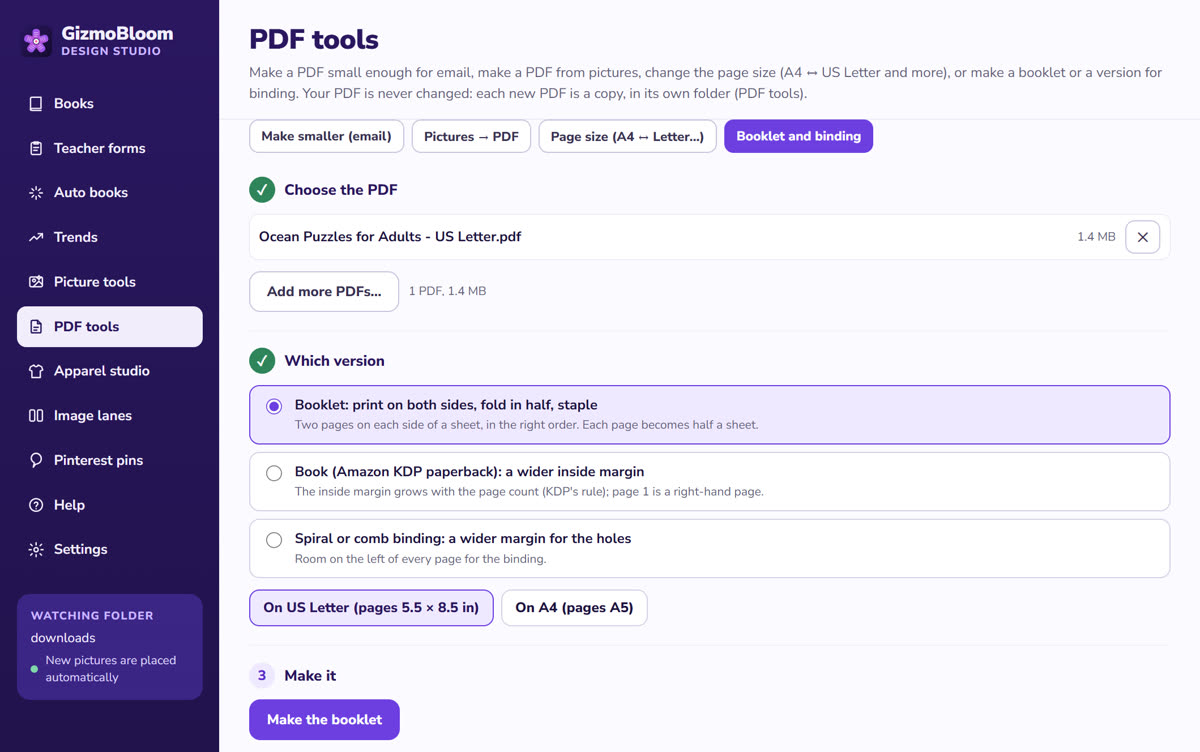
Open PDF tools
PDF tools → Booklet and binding → "Booklet: print on both sides, fold in half, staple".
Choose the PDF and the paper
Pick your PDF, then "On US Letter" or "On A4".
Make the booklet
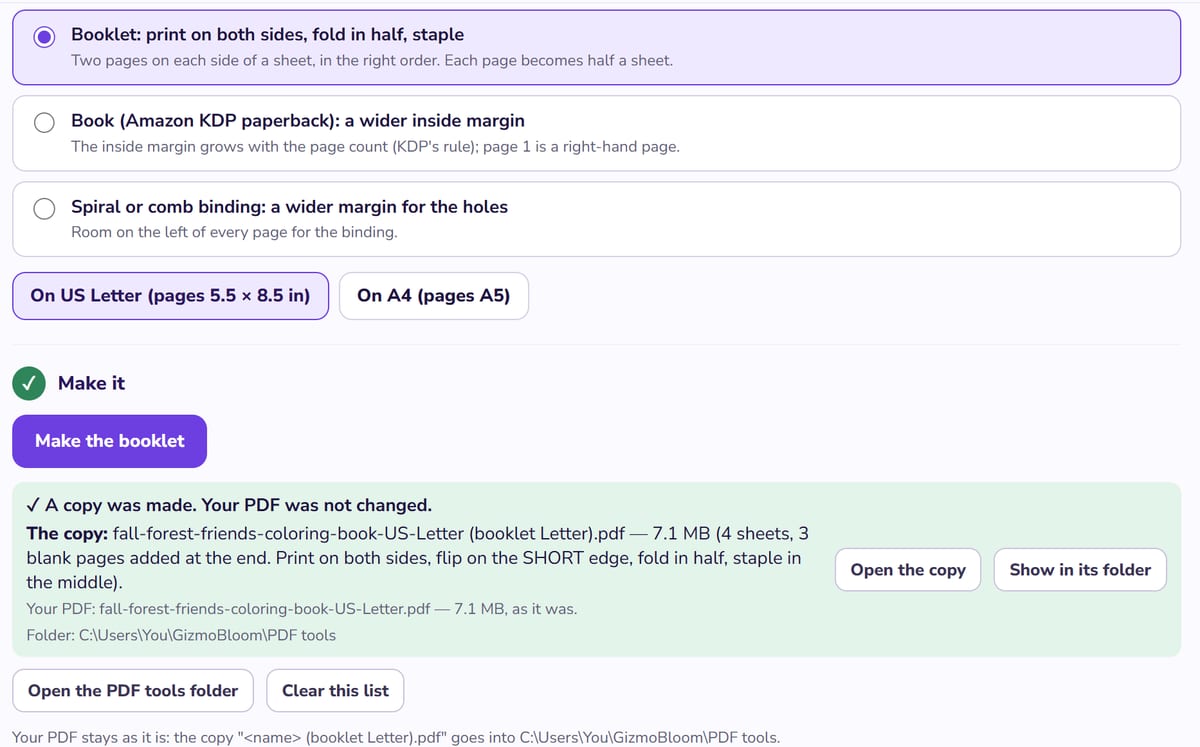
GizmoBloom shows the sheets, the blank pages it added and how to print: both sides, flip on the short edge.
What you get
Here a 13-page coloring book became a 16-page booklet on 4 sheets, with 3 blank pages added at the end — and the printing steps, so you don't have to remember them.
The same page also adds a KDP paperback or spiral binding margin, makes PDFs small enough for email, turns pictures into a PDF and changes A4 ↔ US Letter.
Making a puzzle book? A short one prints well as a booklet — see how to make a puzzle book for KDP.
Watch it step by step
The PDF tools, from the GizmoBloom Complete Guide. All 16 parts →
Questions about PDF booklets
How many pages can a folded booklet have?
Any multiple of 4: 4, 8, 12, 16 and so on. At home, up to about 40 pages (10 sheets) folds and staples well. Thicker booklets start to creep.
What does "flip on short edge" mean?
The printer turns the paper over along its short side before it prints the back. Booklet sheets are landscape, so this keeps the backs upright. "Flip on long edge" usually turns them upside down.
What size is a booklet made from US Letter or A4 paper?
US Letter makes a half-letter booklet with 5.5 × 8.5 in pages. A4 makes an A5 booklet with 148 × 210 mm pages.
Is there a free booklet maker?
Adobe Acrobat Reader can print a PDF as a booklet for free, and Microsoft Word has a "Book fold" layout (Layout → Margins → Custom Margins → Multiple pages). Both arrange the pages when you print. GizmoBloom saves the booklet as its own PDF. You can try it free for 3 days, no card needed; files made during the trial carry a small SAMPLE mark.
Can GizmoBloom make a booklet from any PDF?
From most PDFs, one or several at once. A PDF protected with a password must first be saved as a copy without the protection. Your original PDF is never changed: the booklet is a new copy.
Make your next booklet in one click
Try every feature for 3 days, no card needed. Files made during the trial carry a small SAMPLE mark.
More guides: how to make a puzzle book for KDP, how to bulk upload pins to Pinterest and how to turn a picture into a crochet pattern. All guides →