
How to turn a picture into a crochet pattern: chart, rows and PDF
A step-by-step guide for designers who sell blanket and pillow patterns: pick a picture that charts well, choose the stitch, work out the size and the yarn, write every row and make a PDF buyers can follow. It works with graph paper, a spreadsheet or a crochet chart maker.
What a picture pattern is made of
Four parts, all from the same chart, so they must agree:
- The chart (or graph): one square = one stitch or tile, in one color
- The written rows: each row as colors and counts
- Sizes and yarn per color, worked out from the gauge
- The PDF: all of it, plus materials, a stitch guide and finishing
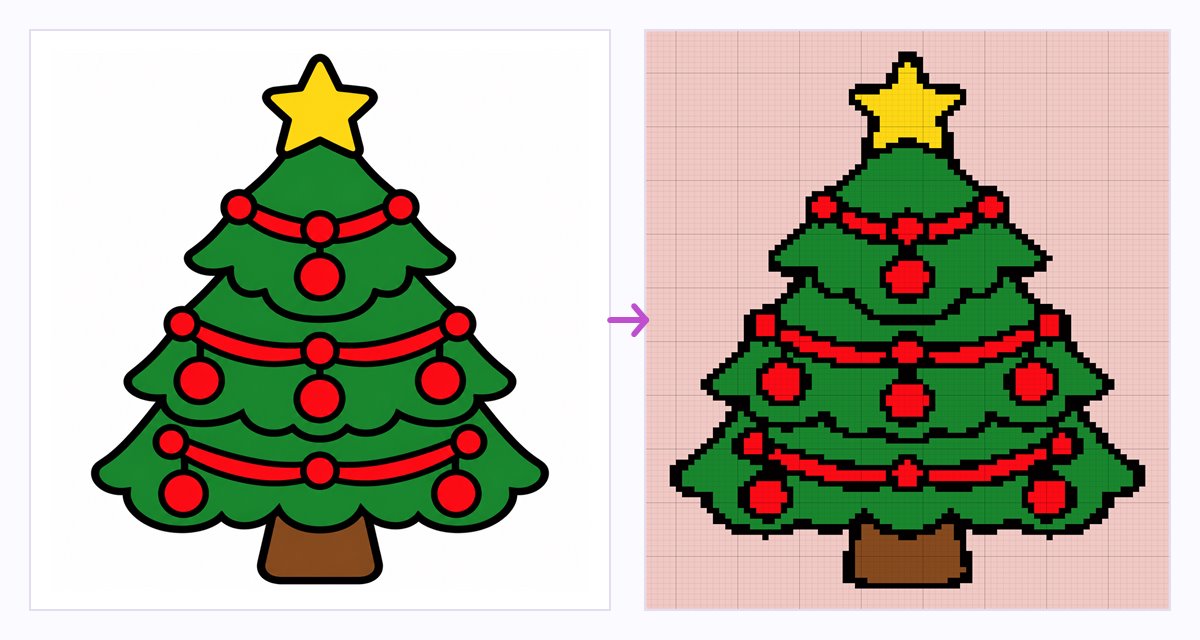
1. Choose a picture that works
Crochet turns a picture into big square pixels. What looks fine on screen can turn to mush on a grid 60 squares wide. Look for:
- Few flat colors. No gradients, shadows or photo textures.
- Bold shapes and thick outlines. A line thinner than about two squares tends to break up.
- A plain background, so the subject stands out and the background is one yarn.
- Big letters only. Small text needs a very wide chart.
- Your own design, or art you have the rights to sell. Never another seller's photo or a brand character.
2. Choose the stitch: graphgan, C2C or granny
Each stitch changes the size, the look and the time it takes.
Single crochet graphgan
One square = one single crochet (sc), in flat rows. Fine detail and clear letters, but slow. Carry the unused colors inside the stitches and it's called tapestry crochet.
C2C (corner to corner)
One square = one tile: a chain-3 space and 3 double crochet, in diagonal rows from a corner. Quick and chunky, a popular choice for picture blankets.
Granny stitch
Clusters of 3 double crochet with small holes between them, in rows like bricks. A lacy, vintage look. A cluster covers two squares, so details are coarser.
Stitches are not square. A single crochet is wider than it is tall: at 16 stitches and 18 rows per 4 in (10 cm), it is 0.25 in wide and 0.22 in tall. On square graph paper, a circle comes out about 11% flatter. The fix: chart rows = picture rows × (row gauge ÷ stitch gauge), here 18 ÷ 16 = 1.125. C2C tiles are about square.
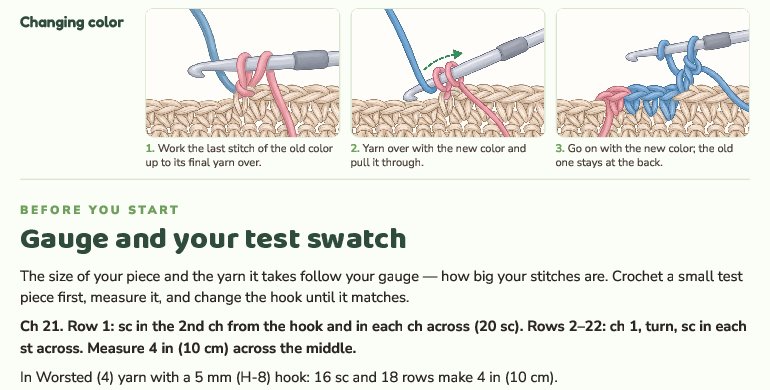
3. Crochet a test swatch
Every number in the pattern depends on your gauge: how many stitches and rows fit in 4 in (10 cm).
- Use the yarn and hook you plan to use.
- Ch 21. Row 1: sc in the 2nd ch from the hook and in each ch across (20 sc). Rows 2–22: ch 1, turn, sc in each st across.
- Measure 4 in (10 cm) across the middle and count the stitches and rows.
- Too many stitches? Try a hook 0.5 mm bigger. Too few? Go 0.5 mm smaller.
Worsted (4) yarn usually suggests about 11–14 single crochet per 4 in. Picture blankets are often worked tighter, with a hook 0.5–1 mm smaller, so carried yarn stays hidden. Trust your swatch, not the label. For C2C, measure a swatch of about 10 × 10 tiles.
4. Work out the size
Decide the finished size, then turn it into stitches and rows. Common sizes:
- Lovey: about 10–16 in (25–40 cm) square
- Baby blanket: about 30 × 36 in (76 × 91 cm)
- Throw: about 50 × 60 in (127 × 152 cm)
- Twin bed: about 66 × 90 in (168 × 229 cm)
- Pillow cover: 14–20 in (36–51 cm), to fit a standard pillow form
Example: a 50 × 60 in throw in single crochet
Swatch: 16 sc and 18 rows = 4 in (10 cm), so 4 stitches and 4.5 rows per inch.
- Width: 50 × 4 = 200 stitches. Height: 60 × 4.5 = 270 rows.
- That's 54,000 single crochet. Place the picture inside that grid, with a plain border of a few squares.
The same throw in C2C
Swatch: 4 tiles = 3 in, so one tile is 0.75 in (about 1.9 cm).
- 50 ÷ 0.75 ≈ 67 tiles across, 60 ÷ 0.75 = 80 tiles up
- Diagonal rows: 67 + 80 − 1 = 146 rows
The chart is the same in every yarn; thicker yarn just makes bigger squares. That's why good patterns give the size for more than one yarn weight.
5. Limit the colors
Every color means more yarn to buy, more color changes and more ends to weave in.
- Keep only the colors the picture needs. Many picture blankets use 4 to 8, background included.
- Merge shades that look the same in yarn: two greens become one.
- Remove lone squares of a common color: they add a color change nobody sees. Keep small details like eyes.
- Give each color a letter (A = background, then B, C…) and a plain name, like "Mint".
- Count the color changes per row: few = easy, many = advanced. State the skill level.
6. Read the chart the way you crochet it
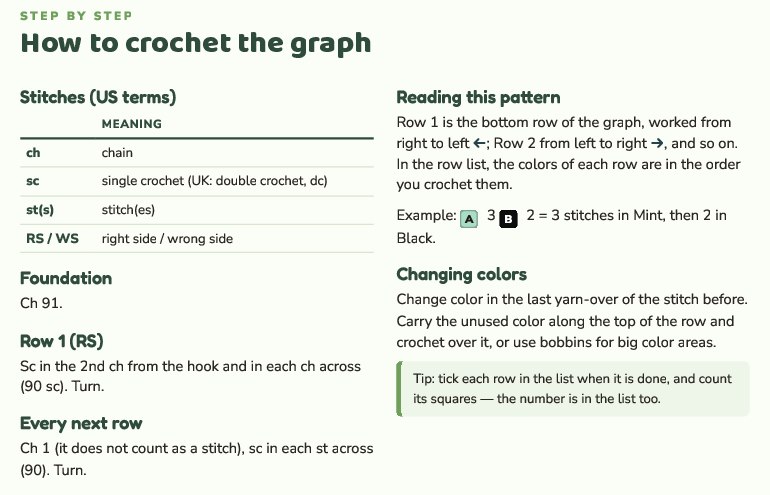
Row 1 is the bottom row of the chart. In flat rows, a right-handed crocheter works odd rows (right side) from right to left and even rows (wrong side) from left to right. Left-handed crocheters work it in mirror. Put an arrow on each row.
A C2C chart is read in diagonal rows from the starting corner. Each row is one tile longer than the last until the piece reaches its edges, then the rows get shorter toward the opposite corner. Thick grid lines every 10 squares make counting easier.
7. Write every row out
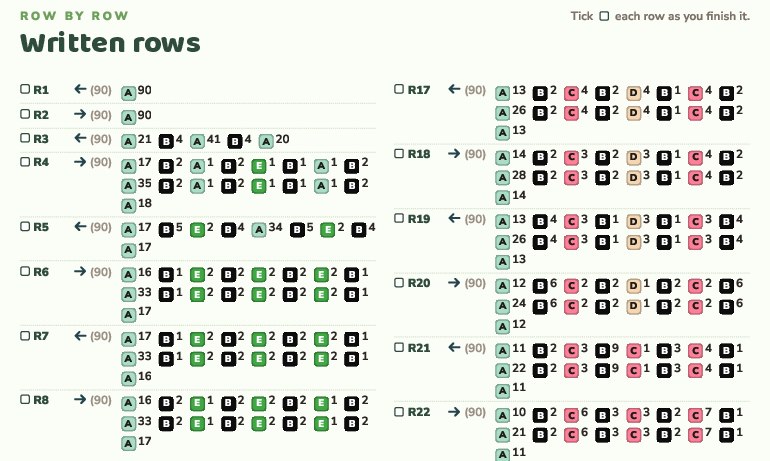
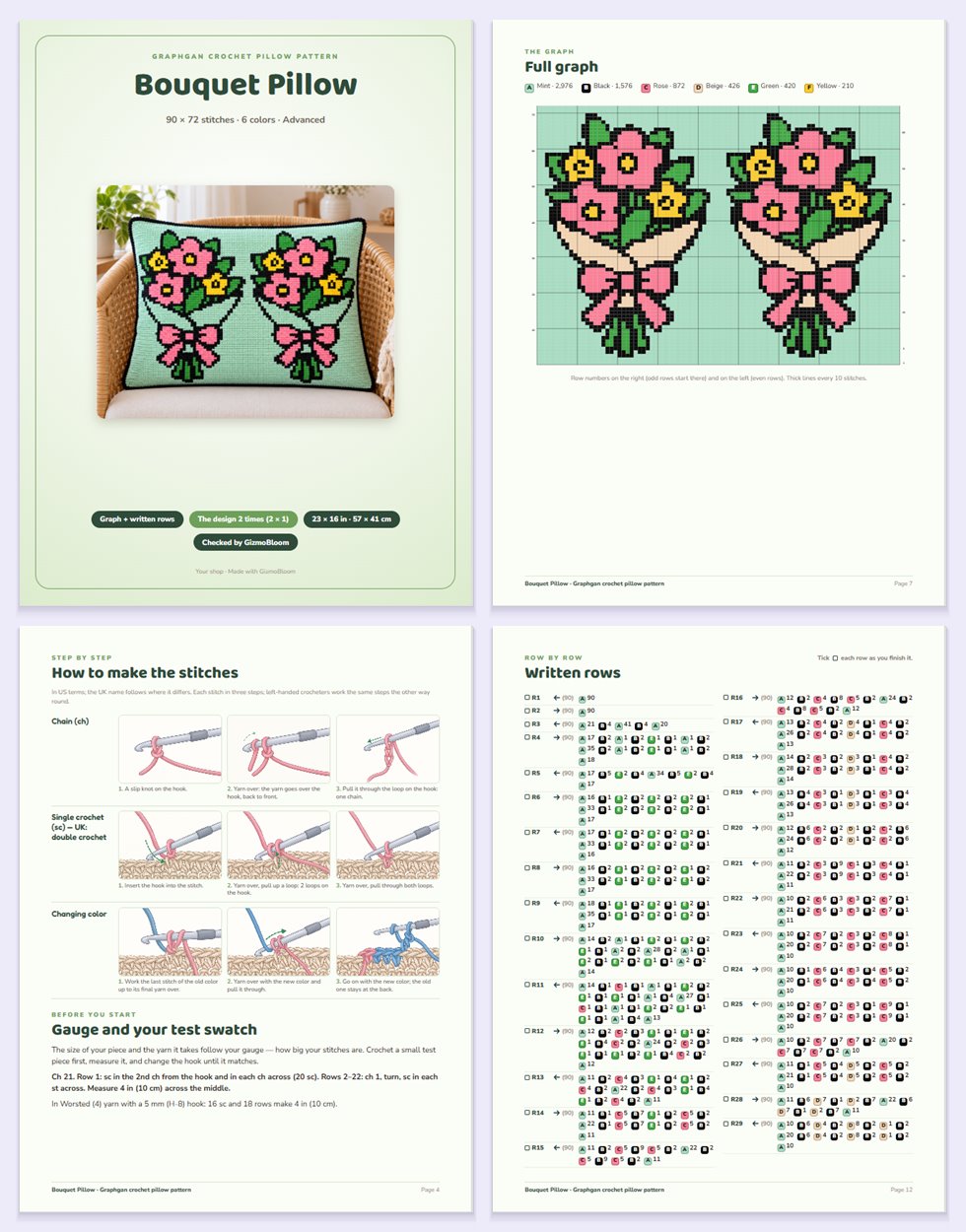
Many buyers prefer written rows to a graph. List each row's colors in working order, with their counts. Row 5 of the pillow shown here:
Row 5 (←, 90 sts): A17, B5, E2, B4, A34, B5, E2, B4, A17
That's 17 stitches in A, then 5 in B, and so on. The counts must add up to the row's width: 90.
A single crochet graph starts with "Ch 91. Row 1: sc in the 2nd ch from the hook and in each ch across (90 sc)." For C2C, give the tiles per row and where increases turn into decreases.
Then rebuild the chart from the written rows alone and compare it square by square. One wrong count shifts the picture for every buyer.
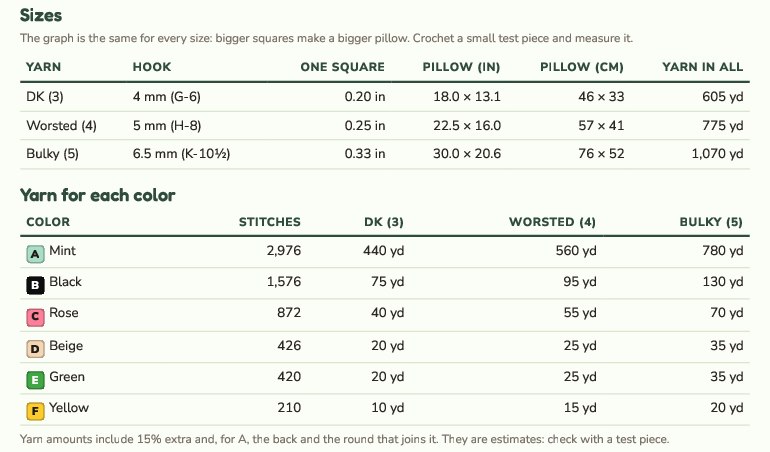
8. Work out the yarn for each color
- Count the stitches of each color on the chart.
- Find the yarn per stitch: unravel your swatch and measure it, or weigh it and use the yards per gram on the label.
- Multiply each color's stitches by the yarn per stitch.
- Add 10–15% for tails and color changes, and the border to the background color.
Example: a worsted swatch of 440 sc used 22 yd, so 0.05 yd (4.6 cm) per stitch. Black has 1,576 stitches: 1,576 × 0.05 ≈ 79 yd, plus 15% ≈ 91 yd. Round up: 95 yd (87 m).
Color changes
- Change color on the last yarn over of the stitch before the new color.
- Short runs: carry the unused color along the top of the row and crochet over it.
- Big areas: a bobbin for each area, the others left at the back. In C2C, bobbins are the usual way.
9. Put it in a PDF buyers can follow
A good pattern answers questions before buyers ask them:
- A cover: the piece, the title, the finished size, the stitch and the skill level
- Materials: yarn weight and yards per color, hook, bobbins, yarn needle
- Gauge and the test swatch
- Abbreviations in US terms, with the UK names (US single crochet = UK double crochet)
- A stitch guide, step by step
- The chart with a color key, plus bigger parts that print well
- Every row written out, with a box to tick
- Finishing: border, ends, blocking and care; then your terms of use
Before you sell, crochet a sample and photograph the real piece: buyers trust real photos, and some marketplaces require them. Then share it: see how to bulk upload pins to Pinterest.
Do it faster with GizmoBloom
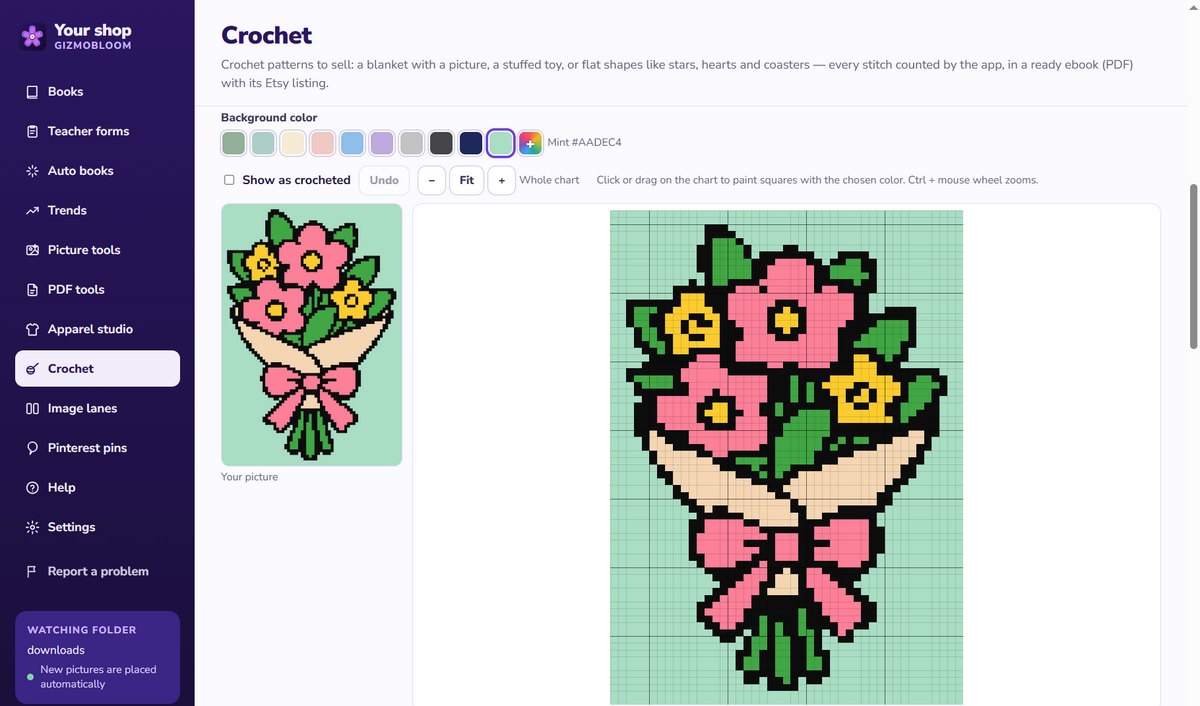
GizmoBloom is a Windows app for pattern and print-on-demand sellers. Its crochet pattern maker does steps 2 to 9 from one picture: you choose, it counts.
- Your picture: your drawing, a design made in GizmoBloom, or one made with your ChatGPT (GizmoBloom can write the prompt)
- C2C, graphgan or granny stitch, for a blanket or a pillow cover
- Sizes by name (Lovey, Baby blanket, Throw, Bed, 14–20 in pillows) or a slider for the squares across
- 1 to 10 picture colors plus the background: merge colors, paint squares, add a plain border
- A warning when thin lines or letters will break at that width
Counted, not guessed
The chart, the written rows, the stitch counts and the yarn amounts are calculated and checked by GizmoBloom's own pattern engine, not written by an AI chatbot. A chart that fails the check doesn't become an ebook. Yards per color come for DK, worsted and bulky yarn, with 15% extra: estimates your swatch confirms.
The ebook (PDF)
Cover, contents, materials, sizes and yarn, the stitches in step-by-step pictures, gauge and swatch, the full graph and the graph bigger in 4 parts, every row with a tick box, finishing, common mistakes, blocking and care, and a project card. In English, French, German and Spanish, US terms with the UK names.
The realistic preview is an AI picture
For your cover and listing, your ChatGPT can turn GizmoBloom's picture of the finished piece into a realistic preview. It's an AI picture, not a photo of a real blanket. Tick the AI box and the ebook and the Etsy listing say so.
Wrote a pattern yourself? The crochet pattern checker recounts every round and row and shows the counts that don't add up.
Questions about picture crochet patterns
What is the difference between a C2C chart and a graphgan chart?
In a single crochet graphgan chart, each square is one single crochet, in flat rows. In a C2C chart, each square is a tile of 3 double crochet, in diagonal rows from a corner. C2C is quicker; single crochet shows finer detail. At the gauges in this guide, 100 squares are about 25 in (64 cm) in single crochet and 75 in (191 cm) in C2C.
Can I make a crochet chart without software?
Yes: on graph paper or in a spreadsheet, one cell per stitch. You can also resize the picture to the chart's width in an image editor, with no smoothing, and reduce it to a few colors. The slow part is writing and checking hundreds of rows by hand.
Can I sell a pattern made from any picture?
Only from a picture you have the rights to: your own drawing or design, or art licensed for that use. Brand characters and other sellers' photos belong to their owners.
Does GizmoBloom write the pattern with AI?
No. The chart, the written rows, the counts and the yarn amounts are computed by GizmoBloom on your computer. Your ChatGPT is only used when you ask it for a new picture or a realistic preview.
Make your first crochet chart free
Try every feature for 3 days, no card needed. Files made during the trial carry a small SAMPLE mark.
More guides: bulk upload pins to Pinterest, make a puzzle book for KDP and make a printable PDF booklet. All guides →